Need to type Greek letters, mathematical operators, scientific notation, or engineering symbols in Microsoft Word? There are three practical approaches: Unicode plus Alt + X, the Insert > Symbol menu, and Math AutoCorrect commands such as \alpha in an equation. The best option depends on whether you are writing an ordinary paragraph or a mathematical expression.
Method 1: Insert symbols quickly with Unicode and Alt + X
- In desktop Word for Windows, click where the symbol should appear.
- Type the Unicode hexadecimal code for a symbol, such as 03B1 for α or 221E for ∞. Do not type the U+ prefix.
- Press Alt + X. Word converts the code to the symbol.
- If you are typing the code directly after a number or letter, select just the code before pressing Alt + X to avoid converting adjacent characters.
Example: type 03C0 followed by Alt + X to produce π. Press Alt + X again after the symbol in supported Word versions to display its code. Microsoft explains the hexadecimal Unicode method in its character-code guide. This shortcut is primarily a Word for Windows feature; do not assume the same key sequence works in Word for Mac or Word for the web.
Quick reference: frequently used math and science symbols
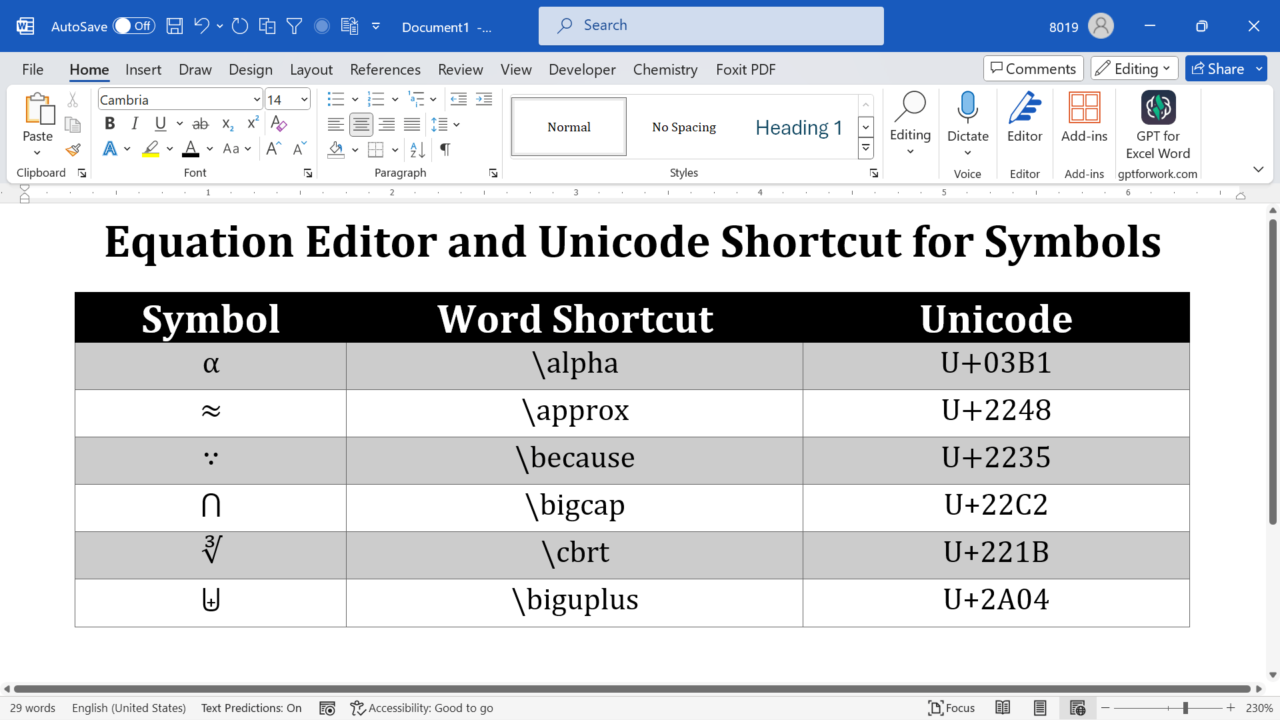
The table below shows Unicode hexadecimal code points rather than legacy font-specific character numbers. Unicode identifies the character, but a font still needs a suitable glyph to display it. For the Math AutoCorrect column, enter commands in a Word equation and then press Space; command support and rendering vary by Word version and the selected equation input mode.
| Symbol | Unicode code | In Word for Windows | Math AutoCorrect (equation input) |
|---|---|---|---|
| ± | 00B1 | 00B1 then Alt + X | \plusmn then Space (availability varies) |
| × | 00D7 | 00D7 then Alt + X | \times then Space |
| ÷ | 00F7 | 00F7 then Alt + X | \div then Space |
| ∞ | 221E | 221E then Alt + X | \infty then Space |
| √ | 221A | 221A then Alt + X | \sqrt then Space (equation structure) |
| ≤ | 2264 | 2264 then Alt + X | \leq then Space |
| ≥ | 2265 | 2265 then Alt + X | \geq then Space |
| ≠ | 2260 | 2260 then Alt + X | \neq then Space |
| α | 03B1 | 03B1 then Alt + X | \alpha then Space |
| β | 03B2 | 03B2 then Alt + X | \beta then Space |
| Δ | 0394 | 0394 then Alt + X | \Delta then Space |
| π | 03C0 | 03C0 then Alt + X | \pi then Space |
| σ | 03C3 | 03C3 then Alt + X | \sigma then Space |
| ∑ | 2211 | 2211 then Alt + X | \sum then Space |
Method 2: Use Math AutoCorrect commands inside equations
Word’s equation editor recognizes convenient command-style sequences such as \alpha, \times, and \infty. These are Math AutoCorrect shortcuts, not ordinary Windows keyboard shortcuts. Their command syntax resembles LaTeX, but the two equation input modes are not identical.
- In Word for Windows, press Alt + = to start an equation, or choose Insert > Equation. On supported Word for Mac versions, use Control + = or the Insert menu.
- If needed, choose UnicodeMath rather than LaTeX in the equation conversion settings.
- Type a supported command such as
\thetaor\infty, then press Space to convert it. Some structures need additional conversion.
For a longer demonstration, see our Word equation-editor shortcuts tutorial. Microsoft also publishes a Math AutoCorrect quick-start guide.
Method 3: Enable Math AutoCorrect outside equations (Windows)
If you regularly type Greek letters or operators in regular Word paragraphs, some desktop versions allow Math AutoCorrect commands outside equation regions. This is a one-time preference, not a requirement for the Alt + X Unicode method.
- Go to File > Options > Proofing.
- Click AutoCorrect Options, then open the Math AutoCorrect tab.
- Check Use Math AutoCorrect rules outside of math regions, if this option is available.
- Click OK, then type a command such as
\alphafollowed by Space in a normal paragraph to check it.
If this option is unavailable on your edition or platform, use Insert > Symbol or insert an equation instead. Do not change language or macro security settings to enable these symbols.
Method 4: Insert a symbol using the Word Symbol dialog
- Open Insert > Symbol > More Symbols.
- Choose a font containing the needed character, such as Segoe UI Symbol for many Unicode symbols.
- Find the character by browsing the subsets or entering its Unicode code in Character code.
- Click Insert, then close the dialog.
This method is useful on Mac and in environments without an Alt + X shortcut. On macOS, Control + Command + Space can open Character Viewer; search for the symbol by name. The precise Symbol dialog options and available fonts vary by platform. For a mathematical operator, verify the character’s identity rather than selecting a merely similar-looking glyph.
Common problems and how to fix them
Alt + X changes the wrong characters: select only the hexadecimal code before pressing the shortcut. For example, when entering a symbol after a number in a formula, do not accidentally include the preceding number in the conversion.
The symbol shows as an empty square: select the character and try a font containing that Unicode glyph, such as Segoe UI Symbol on Windows or Cambria Math for many mathematical expressions. Font availability differs on Mac and the web. Export a PDF and inspect the result before sharing a document with uncommon symbols.
A backslash command stays as text: check that you are inside a Word equation, that the input mode matches the command, and that you pressed Space. Some commands also work outside math regions only after enabling the optional Math AutoCorrect setting.
Unicode and Alt codes are confused: 00D7 then Alt + X is a Word Unicode conversion; Alt + 0215 uses the Windows numeric keypad and can depend on the input environment. These are different methods.
Minus sign versus hyphen: the mathematical minus sign − (U+2212) is different from the ordinary keyboard hyphen – (U+002D). For equations and professional scientific typesetting, use the appropriate mathematical character or the Word equation editor.
Are there special shortcuts for frequently used symbols? Yes. See our related tutorials on multiplication and division signs, sigma, and the degree symbol.
Additional symbol reference table
The original PickupBrain reference table is retained below for readers who prefer the longer list. For reliability, distinguish Unicode conversion from keyboard-layout-specific Alt codes and Math AutoCorrect commands.
| Name | Symbol | Ms Word Shortcut | Unicode Code |
|---|---|---|---|
| above | ┴ | \above | U+2534 |
| acute | ́ | \acute | ́U+0301 |
| aleph | ℵ | \aleph | U+2135 |
| alpha | α | \alpha | U+03B1 |
| amalg | ∐ | \amalg | U+2210 |
| angle | ∠ | \angle | U+2220 |
| aoint | ∳ | \aoint | U+2233 |
| approximate | ≈ | \approx | U+2248 |
| asmash | ⬆ | \asmash | U+2B06 |
| asterisk | ∗ | \ast | U+2217 |
| asymp | ≍ | \asymp | U+224D |
| atop | ¦ | \atop | U+00A6 |
| Bar | ̿ | \Bar | U+033F |
| bar | ̅ | \bar | U+0305 |
| because | ∵ | \because | U+2235 |
| begin | 〖 | \begin | U+3016 |
| beta | β | \beta | U+03B2 |
| bet | ℶ | \beth | U+2136 |
| bigcap | ⋂ | \bigcap | U+22C2 |
| bigcup | ⋃ | \bigcup | U+22C2 |
| bigodot | ⨀ | \bigodot | U+2A00 |
| bigoplus | ⨁ | \bigoplus | U+2A01 |
| bigotimes | ⨂ | \bigotimes | U+2A02 |
| bigsqcup | ⨆ | \bigsqcup | U+2A06 |
| biguplus | ⨄ | \biguplus | U+2A04 |
| bigvee | ⋁ | \bigvee | U+22C1 |
| bigwedge | ⋀ | \bigwedge | U+22C0 |
| bowtie | ⋈ | \bowtie | U+22C8 |
| bot | ⊥ | \bot | U+22A5 |
| box | □ | \box | U+25A1 |
| bra | ⟨ | \bra | U+27E8 |
| breve | ̆ | \breve | ̆U+0306 |
| bullet | ∙ | \bullet | U+2219 |
| cap | ∩ | \cap | U+2229 |
| Cube root | ∛ | \cbrt | U+221B |
| Center dot | ⋅ | \cdot | U+22C5 |
| Center dots | ⋯ | \cdots | U+22EF |
| check | ̌ | \check | ̌U+030C |
| chi | χ | \chi | U+03C7 |
| circle | ∘ | \circ | U+2218 |
| close | ┤ | \close | U+2524 |
| Club suit | ♣ | \clubsuit | U+2663 |
| coint | ∲ | \coint | U+2232 |
| congruence | ≅ | \cong | U+2245 |
| cup | ∪ | \cup | U+222A |
| daleth | ℸ | \daleth | U+2138 |
| dashv | ⊣ | \dashv | U+22A3 |
| Double D | ⅅ | \Dd | U+2145 |
| Double b | ⅆ | \dd | U+2146 |
| Four dots | ⃜ | \ddddot | U+20DC |
| Three dots | ⃛ | \dddot | U+20DB |
| Double dots | ̈ | \ddot | ̈U+0308 |
| ddots | ⋱ | \ddots | U+22F1 |
| degree | ° | \degree | U+00B0 |
| Degree Celsius | ℃ | \degc | U+2109 |
| Degree Fahrenheit | ℉ | \degf | U+2103 |
| Delta | Δ | \Delta | U+0394 |
| delta | δ | \delta | U+03B4 |
| Diamond suit | ♢ | \diamondsuit | U+2662 |
| division | ÷ | \div | U+00F7 |
| dot | ̇ | \dot | ̇U+0307 |
| Dot equal to | ≐ | \doteq | U+2250 |
| dots | … | \dots | U+2026 |
| Down arrow | ⇓ | \Downarrow | U+21D3 |
| Down arrow | ↓ | \downarrow | U+2193 |
| dsmash | ⬇ | \dsmash | U+2B07 |
| Double e | ⅇ | \ee | U+2147 |
| ell | ℓ | \ell | U+2113 |
| Empty set | ∅ | \emptyset | U+2205 |
| end | 〗 | \end | U+3017 |
| epsilon | ϵ | \epsilon | U+03F5 |
| eqno | # | \eqno | U+0023 |
| equivalence | ≡ | \equiv | U+2261 |
| eta | η | \eta | U+03B7 |
| exists | ∃ | \exists | U+2203 |
| For all | ∀ | \forall | U+2200 |
| Gamma | Γ | \Gamma | U+0393 |
| gamma | γ | \gamma | U+03B3 |
| Greater than equal to | ≥ | \ge | U+2265 |
| gets | ← | \gets | U+2190 |
| Much greater than | ≫ | \gg | U+226B |
| gimel | ℷ | \gimel | U+2137 |
| grave | ̀ | \grave | U+0300 |
| hat | ̂ | \hat | U+0302 |
| hbar | ℏ | \hbar | U+210F |
| Heart suit | ♡ | \heartsuit | U+2661 |
| Hook left arrow | ↩ | \hookleftarrow | U+21A9 |
| Hook right arrow | ↪ | \hookrightarrow | U+21AA |
| H phantom | ⬉ | \hphantom | U+2B04 |
| hvec | ⃑ | \hvec | U+20D1 |
| Double i | ⅈ | \ii | U+2148 |
| Fourth integral | ⨌ | \iiiint | U+2A0C |
| Triple integral | ∭ | \iiint | U+222D |
| Double integral | ∬ | \iint | U+222C |
| Im | ℑ | \Im | U+2111 |
| imath | ı | \imath | U+0131 |
| in | ∈ | \in | U+2208 |
| Increment | ∆ | \inc | U+2206 |
| infinity | ∞ | \infty | U+221E |
| integral | ∫ | \int | U+222B |
| iota | ι | \iota | U+03B9 |
| Double j | ⅉ | \jj | U+2149 |
| J math | ȷ | \jmath | U+0237 |
| kappa | κ | \kappa | U+03BA |
| ket | ⟩ | \ket | U+27E9 |
| Lambda | Λ | \Lambda | U+039B |
| lambda | λ | \lambda | U+03BB |
| Left angle | 〈 | \langle | U+27E8 |
| Left brace | { | \lbrace | U+007B |
| Left brack | [ | \lbrack | U+005B |
| Left ceil | ⌈ | \lceil | U+2308 |
| Left div | ∕ | \ldiv | U+2215 |
| Left dots | … | \ldots | U+2026 |
| Less than equal to | ≤ | \le | U+2264 |
| Left arrow | ⇐ | \Leftarrow | U+21D0 |
| Left arrow | ← | \leftarrow | U+2190 |
| Left harpoon down | ↽ | \leftharpoondown | U+21BD |
| Left harpoon up | ↼ | \leftharpoonup | U+21BC |
| Left right arrow | ⇔ | \Leftrightarrow | U+21D4 |
| Left right arrow | ↔ | \leftrightarrow | U+2194 |
| Less than equal to | ≤ | \leq | U+2264 |
| Left floor | ⌊ | \lfloor | U+230A |
| Much less than | ≪ | \ll | U+226A |
| Long left arrow | ⟸ | \Longleftarrow | U+27F8 |
| Long left arrow | ⟵ | \longleftarrow | U+27F5 |
| Long left right arrow | ⟺ | \Longleftrightarrow | U+27FA |
| Long left right arrow | ⟷ | \longleftrightarrow | U+27F7 |
| Long right arrow | ⟹ | \Longrightarrow | U+27F9 |
| Long right arrow | ⟶ | \longrightarrow | U+27F6 |
| Maps to | ↦ | \mapsto | U+21A6 |
| mid | ∣ | \mid | U+2223 |
| models | ⊨ | \models | U+22A8 |
| Minus plus | ∓ | \mp | U+2213 |
| mu | μ | \mu | U+03BC |
| nabla | ∇ | \nabla | U+2207 |
| ndiv | ⊘ | \ndiv | U+2298 |
| Not equal to | ≠ | \ne | U+2260 |
| North east arrow | ↗ | \nearrow | U+2197 |
| Not equal | ≠ | \neq | U+2260 |
| ni | ∋ | \ni | U+220B |
| norm | ‖ | \norm | U+2016 |
| nu | ν | \nu | U+03BD |
| North west arrow | ↖ | \nwarrow | U+2196 |
| O dot | ⊙ | \odot | U+2299 |
| Cyclic triple integral | ∰ | \oiiint | U+2230 |
| Cyclic double integral | ∯ | \oiint | U+222F |
| Cyclic integral | ∮ | \oint | U+222E |
| Omega | Ω | \Omega | U+03A9 |
| omega | ω | \omega | U+03C9 |
| O minus | ⊖ | \ominus | U+2296 |
| open | ├ | \open | U+251C |
| O plus | ⊕ | \oplus | U+2295 |
| O slash | ⊘ | \oslash | U+2298 |
| O times | ⊗ | \otimes | U+2297 |
| over | / | \over | U+002F |
| overbar | ¯ | \overbar | U+00AF |
| Over brace | ⏞ | \overbrace | U+23DE |
| Over parenthesis | ⏜ | \overparen | U+23DC |
| parallel | ∥ | \parallel | U+2225 |
| partial | ∂ | \partial | U+2202 |
| phantom | ⟡ | \phantom | U+27E1 |
| Phi | Φ | \Phi | U+03A6 |
| phi | ϕ | \phi | U+03D5 |
| Pi | Π | \Pi | U+03A0 |
| pi | π | \pi | U+03C0 |
| Plus minus | ± | \pm | U+00B1 |
| Four prime | ⁗ | \pppprime | U+2057 |
| Triple prime | ‴ | \ppprime | U+2034 |
| Double prime | ″ | \pprime | U+2033 |
| Precedes | ≺ | \prec | U+227A |
| Precedes equal to | ≼ | \preceq | U+227C |
| prime | ′ | \prime | U+2032 |
| product | ∏ | \prod | U+220F |
| Proportional to | ∝ | \propto | U+221D |
| Psi | Ψ | \Psi | U+03A8 |
| psi | ψ | \psi | U+03C8 |
| Quad root | ∜ | \qdrt | U+221C |
| Right angle | 〉 | \rangle | U+27E9 |
| ratio | ∶ | \ratio | U+2236 |
| Right brace | } | \rbrace | U+007D |
| Right bracket | ] | \rbrack | U+005D |
| Right ceil | ⌉ | \rceil | U+2309 |
| right dots | ⋰ | \rddots | U+22F0 |
| Re | ℜ | \Re | U+211C |
| rectangle | ▭ | \rect | U+25AD |
| Right floor | ⌋ | \rfloor | U+230B |
| rho | ρ | \rho | U+03C1 |
| Right arrow | ⇒ | \Rightarrow | U+21D2 |
| Right arrow | → | \rightarrow | U+2192 |
| Right harpoon down | ⇁ | \rightharpoondown | U+21C1 |
| Right harpoon up | ⇀ | \rightharpoonup | U+21C0 |
| S divide | ⁄ | \sdiv | U+2044 |
| South east arrow | ↘ | \searrow | U+2198 |
| Set minus | ∖ | \setminus | U+2216 |
| Sigma | Σ | \Sigma | U+03A3 |
| sigma | σ | \sigma | U+03C3 |
| sim | ∼ | \sim | U+223C |
| similar or equal to | ≃ | \simeq | U+2243 |
| smash | ⬍ | \smash | U+2B0D |
| Spade suit | ♠ | \spadesuit | U+2660 |
| Square cap | ⊓ | \sqcap | U+2293 |
| Square cup | ⊔ | \sqcup | U+2294 |
| Square root | √ | \sqrt | U+221A |
| Square sub set equal to | ⊑ | \sqsubseteq | U+2291 |
| Square super set equal to | ⊒ | \sqsuperseteq | U+2292 |
| star | ⋆ | \star | U+22C6 |
| Sub set | ⊂ | \subset | U+2282 |
| Sub set equal to | ⊆ | \subseteq | U+2286 |
| succeeds | ≻ | \succ | U+227B |
| Succeeds equal to | ≽ | \succeq | U+227D |
| sum | ∑ | \sum | U+2211 |
| Super set | ⊃ | \superset | U+2283 |
| Super set equal to | ⊇ | \superseteq | U+2287 |
| South west arrow | ↘ | \swarrow | U+2199 |
| tau | τ | \tau | U+03C4 |
| therefore | ∴ | \therefore | U+2234 |
| Theta | Θ | \Theta | U+0398 |
| theta | θ | \theta | U+03B8 |
| tilde | ̃ | \tilde | U+0303 |
| times | × | \times | U+00D7 |
| to | → | \to | U+2192 |
| T vec | ⃡ | \tvec | U+20E1 |
| Under bar | ▁ | \underbar | U+2581 |
| Under brace | ⏟ | \underbrace | U+23DF |
| Under parenthesis | ⏝ | \underparen | U+23DD |
| Up arrow | ⇑ | \Uparrow | U+21D1 |
| uparrow | ↑ | \uparrow | U+2191 |
| Up down arrow | ⇕ | \Updownarrow | U+21D5 |
| Up down arrow | ↕ | \updownarrow | U+2195 |
| U plus | ⊎ | \uplus | U+228E |
| Upsilon | Υ | \Upsilon | U+03A5 |
| upsilon | υ | \upsilon | U+03C5 |
| Var epsilon | ε | \varepsilon | U+03B5 |
| Var phi | Φ | \varphi | U+03C6 |
| Var pi | ϖ | \varpi | U+03D6 |
| Var rho | ϱ | \varrho | U+03F1 |
| Var sigma | ς | \varsigma | U+03C2 |
| Var theta | ϑ | \vartheta | U+03D1 |
| V bar | │ | \vbar | U+2502 |
| V dash | ⊢ | \vdash | U+22A2 |
| Vertical dots | ⋮ | \vdots | U+22EE |
| vector | ⃗ | \vec | U+20D7 |
| vee | ∨ | \vee | U+2228 |
| Vert | ‖ | \Vert | U+2016 |
| vert | | | \vert | U+007C |
| Vertical phantom | ⇳ | \vphantom | U+21F3 |
| wedge | ∧ | \wedge | U+2227 |
| wp | ℘ | \wp | U+2118 |
| wr | ≀ | \wr | U+2240 |
| Xi | Ξ | \Xi | U+039E |
| xi | ξ | \xi | U+03BE |
| zeta | ζ | \zeta | U+03B6 |
Frequently asked questions about Unicode symbols in Word
Is Unicode the same as an Alt code?
No. A hexadecimal Unicode code point followed by Alt + X is a conversion feature in desktop Word for Windows. Numeric-keypad Alt codes use a different input method and may depend on legacy character mappings. When accuracy matters, use the Unicode value shown in the reference table.
Why does a symbol change when I switch fonts?
The Unicode character stays the same, but each font supplies its own glyph design and may not support every character. For mathematical expressions, use a math-capable font such as Cambria Math; for ordinary text, choose a font with the required symbol coverage. Do not substitute a similar-looking character just to match the appearance.
Should I use symbols or Word equations?
Use Unicode symbols for occasional inline characters such as ± or α. Avoid inserting screenshots of text-only equations: editable equations and Unicode characters are generally easier to search and maintain, and meaningful descriptions are needed for complex mathematical content to support accessibility. Use Insert > Equation for structured fractions, matrices, roots, or expressions that need consistent mathematical layout and editing.
Summary
For individual symbols in ordinary Word text on Windows, use Unicode + Alt + X. For mathematical expressions, use Insert > Equation and Math AutoCorrect. For visual browsing or platforms with different shortcuts, use Insert > Symbol.
Worked example: type a scientific sentence with correct symbols
In a new Word document on Windows, type Temperature = 25 °C ± 2 °C. To enter the degree sign, type 00B0 and press Alt + X; for ±, use 00B1 followed by Alt + X. Then type α = 0.05 using 03B1 for alpha. Compare the results with the characters shown here, select only the hexadecimal code if conversion picks up neighboring characters, and check the exported PDF. For a complex equation rather than inline text, use Word’s equation editor.
Accessibility and document quality check
Use real Unicode text or editable Word equations rather than screenshots for simple symbols. For complex equations, provide an explanation in surrounding prose and check that the expression remains understandable with assistive technology. Do not rely on font appearance alone to distinguish the multiplication sign × from the letter x, or the mathematical minus − from a hyphen.
Related Posts

C P Gupta is a YouTuber and Blogger. He is expert in Microsoft Word, Excel and PowerPoint. His YouTube channel @pickupbrain is very popular and has crossed 9.9 Million Views.
Pingback: How to Type the Nabla Symbol in MS Word and its shortcut
Pingback: Ms Word shortcut for Square Root, Cube Root and more - PickupBrain: Be Smart